
How to use SeatSpend
Seat reports and renewal alerts for monday.com admins
SeatSpend is an administration view for monday account admins. It reports which paid seats nobody is using, prices them at your real per seat cost, and counts down to your renewal so the cleanup happens before the bill, not after it.
This page covers installing it, opening it the first time, entering your price and renewal date, what the scheduled digest does, and how to turn it off.
Before you start
- You need to be an admin of your monday account. SeatSpend lives in the Administration area, which only admins can open.
- Have your latest monday invoice handy. You will enter the amount you actually pay per paid seat each month, so the report shows your real numbers rather than a list price.
- Know your next renewal date if you want the countdown. It is optional, and everything else works without it.
SeatSpend reads your account's user list and each user's last activity date. It does not read boards, items, updates, files, or messages.
1. Install SeatSpend
- Open the SeatSpend listing in the monday marketplace.
- Select Install and choose the account you want it on.
- Review the permissions monday shows you and approve them.
The install starts a 14 day free trial with every feature available. After the trial, billing is handled by monday at $1 per seat per month.
2. Open it for the first time
- In monday, open your avatar menu and go to Administration.
- Select Admin apps.
- Select SeatSpend.
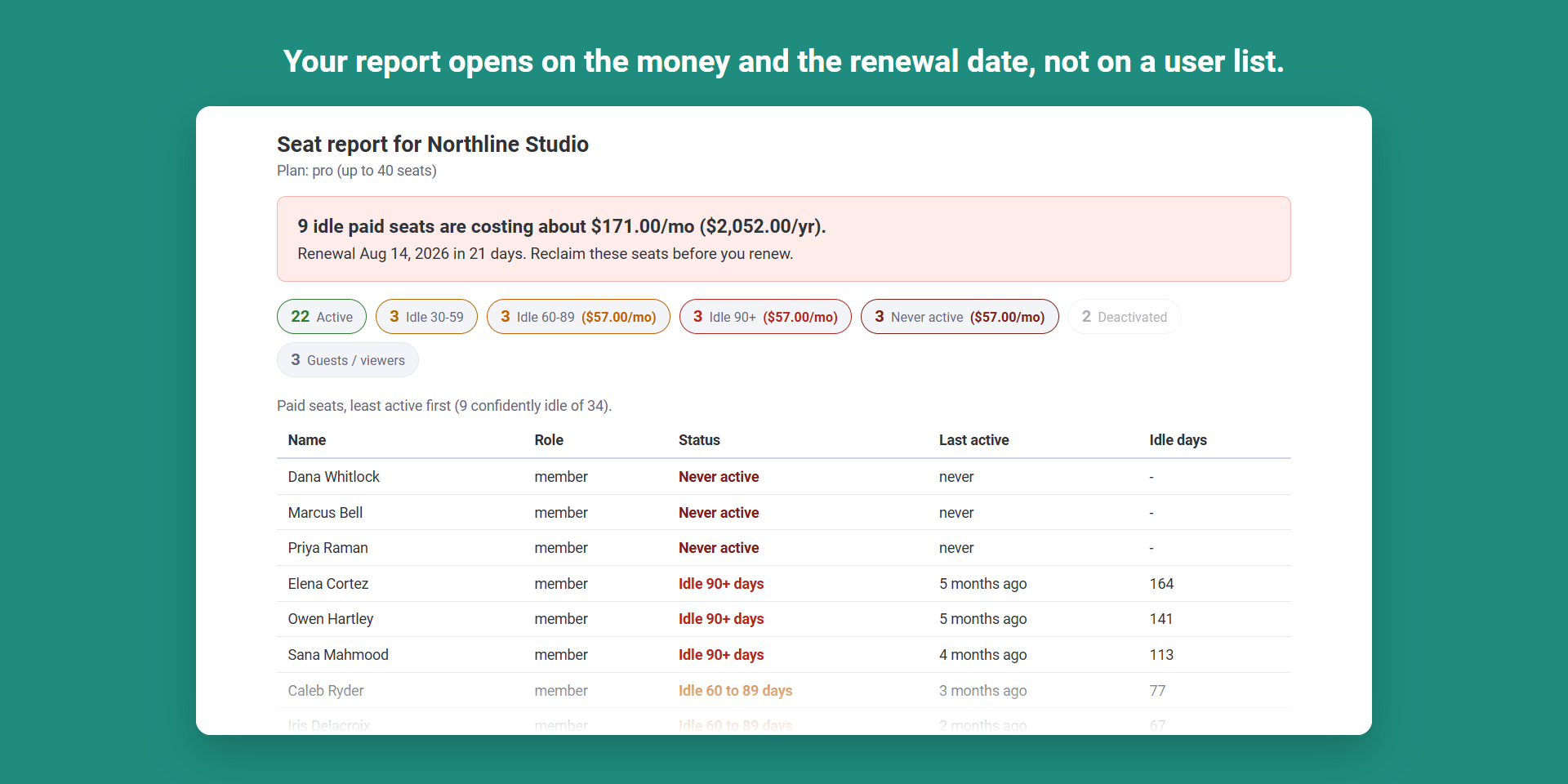
The report opens on the Report tab. The first time you open it, no price is set yet, so the headline shows how many paid seats are sitting idle and invites you to add your price. It never invents a dollar figure it cannot compute.
3. Set your per seat price and renewal date
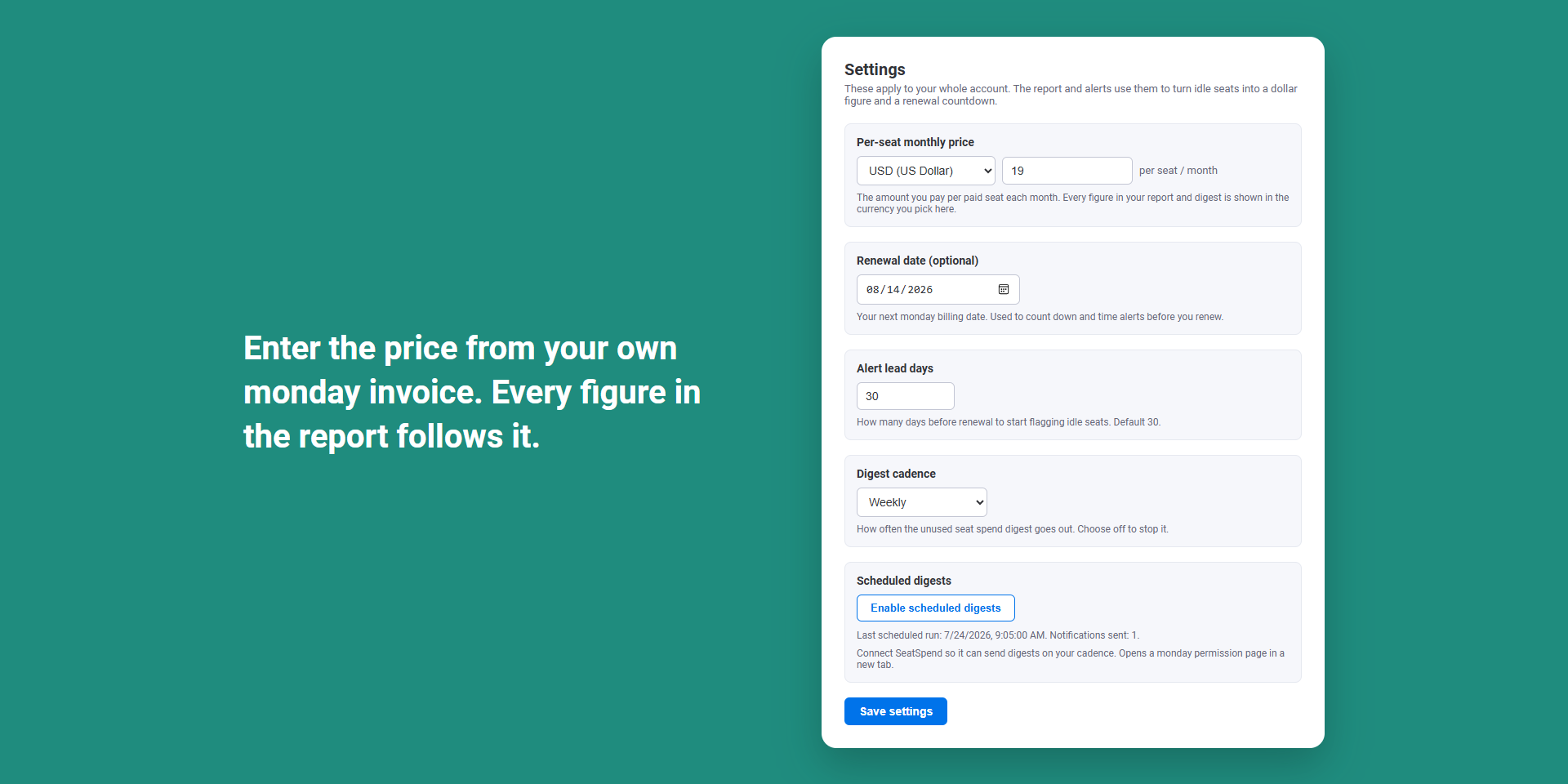
Select the Settings tab and fill in the fields:
| Field | What to enter |
|---|---|
| Per-seat monthly price | The amount you pay per paid seat each month, from your monday invoice. |
| Currency | The currency that price is in. Every figure in the report and in your digests is shown in it. The default is USD. |
| Renewal date (optional) | Your next monday billing date. Used to count down and to time alerts before you renew. |
| Alert lead days | How many days before renewal SeatSpend starts flagging idle seats. The default is 30. |
| Digest cadence | How often the scheduled digest goes out: Weekly, Monthly, or Off. |
Select Save settings. These apply to your whole account, so any admin who opens SeatSpend sees the same figures.
Go back to the Report tab and the headline now reads in money, for example "9 idle paid seats are costing about $171.00/mo ($2,052.00/yr)", with your renewal countdown on the line underneath.
4. Read the report
- The headline card leads with the monthly and yearly figure for the seats that are confidently idle, then the renewal date and how many days are left.
- The bucket chips count your paid seats by activity: Active, Idle 30 to 59 days, Idle 60 to 89 days, Idle 90 plus days, and Never active. The buckets that count toward the dollar figure also show their own monthly amount.
- Idle 30 to 59 days is watched, not counted. A single quiet month catches people on holiday and monthly reviewers, so SeatSpend only puts a dollar sign on 60 plus days of silence or a user who has never been active.
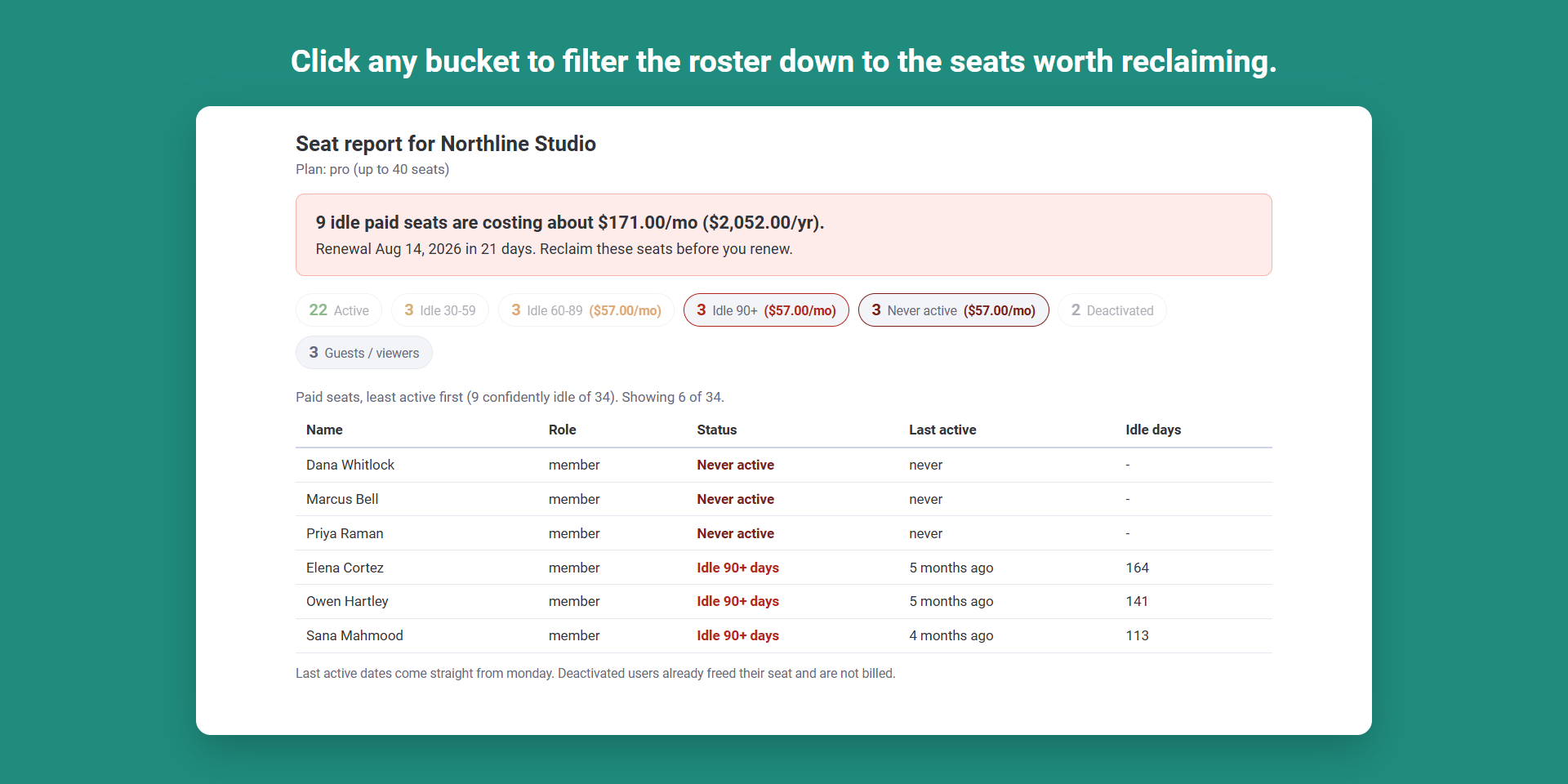
- Click any chip to filter the roster. Chips are toggles, so you can narrow the table to just Idle 90 plus and Never active, which is usually the list you act on. The line above the table tells you how many rows you are seeing.
- The roster lists every paid seat, least active first, with role, bucket, last active date, and idle days.
- Guests, viewers, and deactivated users are kept separate, because they do not hold a paid seat. Deactivated users are available as an opt in chip.
SeatSpend follows your monday theme, so it renders in light, dark, or black to match the rest of your account.
Reclaiming a seat is something you do in monday itself, under Administration and Users. SeatSpend never removes or deactivates anyone for you.
5. Turn on scheduled digests
The report is useful when you open it. The digest is what brings the number back to you without anyone remembering to look.
- On the Settings tab, pick your Digest cadence: Weekly or Monthly.
- Select Enable scheduled digests. A monday permission page opens in a new tab, where you approve the app sending you notifications. This is a one time step per account.
- Select Save settings.
Once connected, the status line under the button shows the last scheduled run and how many notifications went out.
What arrives, and where. Digests are delivered as monday notifications, inside monday. There is no email. Each digest leads with the money, then the renewal line, then the breakdown by bucket and the list of seats worth reclaiming.
When it arrives.
- On your cadence: at least 7 days apart on Weekly, at least 28 days apart on Monthly.
- When every paid seat is active, the digest collapses to a single healthy line, so a quiet month stays quiet.
- Separately from the cadence, the renewal countdown sends a notice when you first cross your alert lead time (30 days by default), again at 14 days, again at 7 days, and once if the renewal date passes. You get at most one notification per milestone.
6. Turn it off
- To stop the recurring digest: set Digest cadence to Off on the Settings tab and select Save settings. Nothing further is sent on a schedule.
- To stop the renewal countdown as well: clear the Renewal date field and save. With no renewal date there is no countdown to send.
- To remove SeatSpend entirely: uninstall it from the monday marketplace or from your Administration area. On uninstall, SeatSpend deletes the settings and the counters it kept for your account.
The Settings tab stays reachable even if a subscription lapses, so you can always turn digests off.
Frequently asked
Does SeatSpend remove idle users for me?
No. It reports and prices them. Removing or deactivating a user stays with you, in monday.
Where does the dollar figure come from?
From the price you enter in Settings, multiplied by the number of confidently idle paid seats. If no price is set, the report shows counts only.
Does it store our user list?
No. Seat names and last active dates are read live from monday each time a report or a digest is built, used for that one output, and then discarded. SeatSpend stores your settings and a few counters, nothing else. See the privacy policy for the full detail.
Which users count as a paid seat?
Members and admins. Guests and viewers do not hold a paid seat, and deactivated users have already freed theirs, so all three are reported separately and are never part of the dollar figure.
Why do I see a seat listed as idle when the person is still with us?
Idle means no recorded activity in monday for that many days. It is a signal about seat usage, not about a person's work. That is exactly why SeatSpend leaves the 30 to 59 day bucket out of the money.
Questions, problems, or a figure that looks wrong: email HHonlineventures@proton.me and include your monday account name and what you were looking at. We answer from the same address.